Brandon Checketts

Web Programming, Linux System Administation, and Entrepreneurship in Athens Georgia

Page 2 of 30

Several AWS Step Function Events Should be Classified as Data Events

At DataAutomation, we use the AWS Step Functions service pretty extensively. It provides a pretty nice, modular framework for us to build custom workflows for customers. We do millions of requests per day to the service. We also use AWS GuardDuty for threat detection.

GuardDuty monitors the CloudTrail log for odd things happening on your AWS Account. It also monitors for suspicious network traffic, and potential weaknesses on your EC2 instances, among other things. I actually like Guard Duty quite a bit.

I have one complaint about this combination of AWS usage though. With our high volume usage of AWS Step Functions, all of those common State Machine usage events like creating tasks, executing the tasks, and deleting them all go through CloudTrail, and thus through Guard Duty for monitoring. GuardDuty can get kindof expensive for this since we’re generating hundreds of thousands or millions of events per day.

S3 and DynamoDB are similar in this respect. When using those services, you can quickly rack up millions of events very quickly. They have a solution that classifies events as either “Management Events” or “Data Events”. Management Events include things like Creating a new S3 Bucket, or changing policies on the bucket. Data events include things like adding, reading or deleting items from the bucket. On the DynamoDB side, Management Events include events like Creating or modifying tables, or access to the tables, while Data Events include things like reading or writing to the tables.

Step Function does include one Data Event, that is InvokeHTTPEndpoint. However, I’d like for the Step Functions team to consider making the events related to “Using” the service into data events as well. This list of events should include all of the Execution events (StartExecution, StartSyncExecution, RedriveExecution, ListExecutions, DescribeExecution, GetExecutionHistory, DescribeStateMachineForExecution, StopExecution) and the Task Token events (SendTaskSuccess, SendTaskHeartbeat, and SendTaskFailure), as well as the GetActivityTask event

I have created an AWS support ticket to try and explain this in as much detail as possible to the Step Functions team. I think it gets lost inside AWS because the effects are not readily apparent to the Step Machine team, since the cost ends up associated with Guard Duty. If you have similar problems, I encourage you to create similar ticket with detailed explanation and that it get directed to the Step Functions team, who I believe is the most qualified team to make this change.

Scripts published for calculating Sales Tax in Texas from Stripe Transaction exports

Following up from my previous complaints about Texas collecting back Sales Tax for Saas companies,, I put quite a bit of time into writing some PHP scripts to calculate the Texas Sales Tax due and complete their forms.

Looking through the actual Stripe transaction detail and determining the sales tax due will save our company tens of thousands of dollars from the original estimated figures that our accountant calculated.

I’m releasing some of the PHP scripts that I wrote for this on GitHub in case anybody else may find them useful. They are pretty plain PHP, so hopefully are straightforward enough to follow.

Head on over to https://github.com/bchecketts/stripe-sales-tax-aid if that would be useful for you. Comment below or make Github Issues if you have something to share.

Texas Collecting Sales tax on SaaS in 2017 is like …

Imagine you were on a road trip in 2017 driving a big RV across the United States from coast to coast. You drove through 200 miles in a corner of Texas, got some gas and a meal there and didn’t think much of it.

Now, in 2024, you’re taking your car on a road trip again and again drive through a corner of the Lone Star State. As you cross the state line, you come upon a tool booth. You’re surprised at the $50 toll, but you recall some random news that states are starting to do this. You pull out your credit card to pay, and the attendant informs you that you owe and additional $1,000 for an unpaid toll when you were last here, 7 years ago.

You comment that you don’t recall it being a toll road back then, and he informs you that it is based on a law from 2008, so it was clearly in-place in 2017. Again, you say that you don’t recall seeing a sign or speeding through a tool booth. He then comments that they didn’t actually have the tool booth built back then. But he shows you a picture from 2017 of a 2-foot tall sign, far off the road that includes 4 paragraphs of the state statute and has an address to mail payment. The sign is partially obscured behind a tree.

You comment that it seems unreasonable to expect somebody from out of state, driving through at highway speeds to be able to read and obey this obscure sign. As you’ve driven around the country, even back in 2017, usually there is ample notice, a toll booth, as they have now, and a reasonably easy way to pay the toll.

The response is that the law is the law. Ignorance doesn’t mean you don’t have to obey it. You can’t proceed through the state. You can pay the toll now, or set up a payment plan. You have the option of turning around and backtracking 200 miles to go an alternate route, but now that they have your picture and know who you are, they may be able to just take the money from your bank account.

That’s a pretty accurate comparison to the State of Texas’s requirement to collect back taxes on Software as a Service from 2017. Only in the past couple years have software companies been aware that SaaS is now taxable in a few states. It would be extremely controversial to collect a toll, like in this example, yet thats a pretty close comparison to what businesses are having to do with Sales and Use Tax there now. It seems there is no leniency, despite their lack of any notice or general instruction, to somebody who they would not have reasonably expected would be aware of this requirement.

UPDATE: I’ve published some of the scripts used for complying with this at https://www.brandonchecketts.com/archives/sales-tax-from-stripe-transactions-report

Simplify Amazon Custom and Amazon Handmade fulfillment with ShipStation and Data Automation’s SyncPersonalized

DataAutomation builds connectors between all kinds of E-Commerce Tools. They integrate with all of the major E-Commerce platforms and tools. A lot of these are custom integrations, but sometimes we run across one that is useful to a lot of people.

One of them that we’ve been having a lot of success with has to do with Amazon sellers who use the Amazon Handmade or Amazon Custom programs. Amazon Custom sells things that are personalized for the buyer. Think buying a T-Shirt on Amazon, and having your name printed on it. Or buying a ring with a customized engraving on it. Amazon Handmade is for products that are made by hand, sortof their equivalent of Etsy.

A lot of Sellers use ShipStation or Veeqo to help them fulfill their orders. These systems print out packing slips, help to buy the right postage, and print out the printing and shipping labels for the sellers. They both have native integrations with Amazon, but because the Amazon API makes it very hard to retrieve the information about the customizations, their integrations don’t retrieve them. That means that tjese sellers have to go back and forth between their shipping/fulfillment system and Amazon Seller Central to find the details for each order. That’s cumbersome, time consuming, and leads to problems.

Do Data Automation built a useful application that supplements the Amazon Order information in ShipStation and Veeqo so that it includes the Customizations that the buyer entered during check-out. The customizations can be printed on packing slips and are visible inside these shipping systems. That can greatly simplify the sellers’ workflow and help them to avoid errors.

I just finished building this into a self-service application, so that sellers can sign up, connect their systems, subscribe, and be up-and-running in just a few minutes. Its called SyncPersonalized and information about is is available on DataAutomation’s Amazon Custom & Handmade page.

Clever Trick to clear a negative DNS Cache

I just discovered a clever trick that can be used to clear a negative DNS Cache entry. I sometimes need to do this if I try to use a DNS resource before I’ve actually created it. For example, when I start a new project, I often intend to use the hostname ‘app.mynewproject.com’ to run the application website. If I try to open this in a browser before creating the DNS entry, many DNS servers will cache the negative response (ie: app.mynewproject.com does NOT exist, so don’t ask the upstream server for it again), sometimes for a long time.

I’ve found that I can often create a CNAME record that points to the desired resource. When looking up the CNAME record, the authoritative server also sends the response for the record that was thought to be invalid. This must clear the cache, so a subsequent request to the previously negatively cached record then works. This is much faster than waiting for it to expire!

Announcing MousePhotos.com – An easier way to copy your Disney Photos to Google Photos

I’ve always found it a pain to copy Disney PhotoPass photos over to my Google Photos account. You have to download them individually (a huge pain), or in batches of zip files, which fails if you select too many, and when it does work, then have to be extracted. Finally, you can upload them to Google Photos.

So I built a small app that does it much easier. Just install the MousePhotos chrome extension. It reads in all of your photos without you having to download them. On the mousephotos site, you create an album and select your photos and it will copy them over to Google Photos in a couple minutes. You can make separate albums for separate trips pretty easily.

I realize it’s a pretty niche audience, but it saves me about 15-30 minutes of tedious work from each trip to Walt Disney World, so I think other people will find it useful as well. Get Started at MousePhotos.com. Use the coupon code ’roundsphere-friends’ for 50% off the posted prices.

Minimal AWS Permissions needed by the FluentSMTP WordPress Plugin

FluentSMTP is a WordPress plugin that allows sending email via many different email providers. Amazon Simple Email Service (SES) is one of many that it supports.

The instructions for setting up an IAM user grant access to everything in SES and SNS by using the predefined AmazonSESFullAccess policy, and for some reason the AmazonSNSFullAccess policy. I’m not sure why they ask for SNS permissions at all!

I’m a proponent the principal of least privilege, so after some trial, I found that this policy grants access only to what is needed:

{
    "Version": "2012-10-17",
    "Statement": [
        {
            "Sid": "VisualEditor0",
            "Effect": "Allow",
            "Action": [
                "ses:SendEmail",
                "ses:SendRawEmail"
            ],
            "Resource": [
                "arn:aws:ses:us-east-1:127069677361:configuration-set/enter-your-configuration-set-name-here",
                "arn:aws:ses:us-east-1:127069677361:identity/enter-your-domain-name-here"
            ]
        },
        {
            "Sid": "VisualEditor1",
            "Effect": "Allow",
            "Action": "ses:ListIdentities",
            "Resource": "*"
        }
    ]
}

Make sure to change the placeholders enter-your-configuration-set-name-here and enter-your-domain-name-here with your actual values. If you want, you seem to be able to get rid of the separate permission for ses:ListIdentities after the Email Provider is saved. It just uses that permission to validate that the IAM credentials are valid.

I’m sure they are trying to keep the configuration steps to a minimum, and creating a separate policy would make a not-exactly-simple setup process even more complicated. But I wish that they would add these minimal permissions to their instructions as an option at least. And remove the mention of AmazonSNSFullAccess because it is not needed at all.

Twenty One Innovations From the Star Wars Galactic Star Cruiser

After we heard that the Star Wars Galactic Star Cruiser was shutting down, my wife and I decided to make a second trip to enjoy it while we still could. Our first visit was shortly after it opened with our six teenage kids. This time it was just adults, so we got to “play” ourselves a little more than when kids were there.

The Star Cruiser is a very unique experience that has been tough for others to describe – which is probably why they haven’t been able to stay busy enough to keep it going. It’s a mix of hotel, restaurant, cruise ship, theater, improv, theme park, escape room and video game, all in the setting of a Galaxy Far, Far awayI

For the ~86,000 people that were able to experience it, there was an impressive amount of innovation on display and to experience.  Below are the things that I thought of, but please comment below if you can think of any that I missed or would like to clarify.

These are not in any particular order, except I tried to put some that I was most impressed with toward the end.

#1 – Custom music, songs for Gaya

The galactic superstar, Gaya, has a pretty important role throughout the voyage, often simply to distract the First Order from the smuggling going on under their noses.  Gaya has had custom songs written for her that I didn’t think were particularly great, but she belts them out with confidence as part of the story.

#2 – Custom Lighting and scents

By no means is this the first instance of Disney using custom lighting or smells, but it these elements are present from the moment you board the Halcyon, and throughout most of the “storytelling” parts of the experience.

#3 – Real emergency versus “in show” emergency

While “boarding” the ship, shortly after going through Security and before traveling “up” to the ship, there is a short orientation video that differentiates between a “Show” alarm and an actual emergency.  The In-Show alarm has strobing red lights and a droid voice stating to meet in the lobby. The actual emergency includes bright white lights and a human voice clearly stating that “this is a real emergency” and “this is not part of the show”.

#4 – Emergency exits from windowless rooms

The most under-utilized innovation which likely required a significant amount of design, construction, and testing is the emergency evacuation procedures from the windowless cabins.  Each stateroom has a small emergency exit window that is visible on the building exterior.  Within the cabin, this opens a narrow passage that presumably further opens to the exterior.  A phone and labels in the space are meant to connect guests to emergency staff that can assist in an evacuation.  

The Reedy Creek Fire Department was trained on how to assist guests in evacuating from these rooms and could do so quickly in an emergency.

#5 – Entire Bridge Experience

The bridge training experience, and subsequent story element where you commandeer the bridge is a pretty fun experience and one of the highlights for myself. There are four stations (Systems, Weapons, Cargo, and Shields). You get a chance at each of the four stations, where each one is taught in one to two minutes. Then you get a 1-2 minute practice round, and a 2-3 minute “real” round to count your score.

The controls are pretty simplistic and kind of “1990s” in design complexity.  But they are pretty effective for the short time frame in which you can learn and then use them.

#6 – Puzzles in the engineering room, access to doors, etc.

Similar to the Bridge Experience, the Engineering room has probably 8 different “puzzles” that you can solve with physical props like levers, buttons, and switches.  These can be fun to solve on their own, but they are also involved in several parts of the story. Depending on which storyline you are following, the First Order commander may meet you in the Engineering Room to “Take Over” the ship by everyone in the group solving the various puzzles simultaneously.  Or the Captain may take you to the Engineering room to also do the same puzzles and “take back” the ship.

#7 – Room droid’s voice recognition

Each cabin has a console where you can check in with the guest experience droid, who has an ongoing story of her own that ties in with the overall story on the ship. Guests can speak to the droid, which uses some now-commonplace speech recognition to understand what you are saying and respond mostly appropriately.

#8 – Custom schedule for each group

This is another not super-impressive innovation, because it is just scheduling, but I can’t think of another place in Disney Parks/Resorts or other places that schedules guests for smaller group events.  Sometime after checking in, you get events in your schedule (inside the Data Pad app) that assign you a custom time for Lightsaber Training, Bridge Training, and a departure time for the Batuu shuttle. The first two of these are specifically for you, and if you miss them, it may not be possible to make them up. The shuttle to Batuu is more flexible as it runs every ~5 minutes and you can come and go as you please after the majority of guests have exited.

#9 – All exterior Screens when ship goes to hyperspace

A nice integration that takes place on a wide scale is that every “exterior” window of the ship that looks out into space are all synchronized so that they all work together and display the status of the ship in the story.  When one of the bridge training crews jumps to Hyperspace, every window in every cabin, and throughout the ship also goes into Hyperspace.  When you arrive in an asteroid field, all of the “windows” show asteroids appropriately. 

#10 – Audio that follows characters on the upper stage area

One of the “stages” on which the actors play out their story is in the balcony above the atrium. From their elevated position, they argue with each other and eventually fight.  The characters often wander back and forth along the balcony and their amplified voices follow them impressively well by using disguised speakers on the railings. The speakers also have a few special effects in the closing battle.

#11 – Secret merchandise compartments

This low-tech innovation is kind of a fun part of the story.  If you talk with the merchandise cast members when the store is empty and subtly mention that you are part of the Resistance and tell them a certain phrase, they will use a magnet to unlock one of several secret compartments in the store that contains merchandise for those willing to help the resistance cause.

#12 – Constantly Progressing, Real-Time Story

After two visits, I still don’t know that I’ve completely followed the story, even with the character that I was following pretty closely. In every other theme park or interactive experience I can think of, the guest fully experiences the entire experience as it was intended. During the Galactic Starcruiser experience, it is literally impossible to catch every aspect of what is happening. Since the story progresses in real-time, things are happening which you have to learn about by other guests telling you about, or by context afterwards.  

On my first visit, I was a little put-off by this and having “missed out” on important things, but I was fascinated by it this time knowing that you aren’t supposed to see everything yourself.  It is much more “real” feeling as in the way we’d experience things outside of the fabricated “rides” and “lands” that we’re used to.

#13 – Lightsaber Training

The lightsaber training has been called elementary by some, and is an important part of the experience to others. I only got to experience it on one of my two trips because they were very strict about the start time and not letting anybody enter once it had begun.

#14 – Rey’s lightsaber 

Much has been written about Rey’s “real” lightsaber, which is seen for a few seconds while it extends before she (often clumsily) swaps it out for one that can be used in the fight.  They even went so far as to file a patent for this innovation

#15 – Custom Sabacc gameplay/rules

A custom version of the game Sabaac was created called “Coruscant Shift”. This version is easy to learn, and, probably more importantly, had rules that didn’t require anything too fancy for the custom Sabacc Holoboard to implement.

#16 – Sabacc holoboard

In the center of the Sublight Lounge is a large, custom Sabacc table game that displays the cards to each player using holograms.  There’s nothing like it and the Imagineers had to create it with custom electronics and screens that showed the holograms.  Again, the gameplay is pretty primitive and simple, but this was probably a fairly significant project to bring together.

#17 – ‘Nearness’ to the characters gains you ‘familiarity’

In the Data Pad app, under your profile, it displays a “nearness” and “trust”  of the main characters.  As far as I can tell, the “nearness” to a character has to do with time that you have actually spent in physical proximity to the character.  I’m unsure exactly how they accomplish this. Most likely it is some kind of NFC tracking built into the Magic Band, or Bluetooth scanner in the App. There are also times, I found, where the character asks for and repeats your name, so perhaps there is an audio prompt as well (or perhaps it is just the actor genuinely trying to remember your name).   

Being “near” to a character seems to unlock certain story arcs and messages you have with them in the app.  Note that according to this interesting video, being near to a character in public places may gain you familiarity with the character, but you have to take actions in favor of the character to gain reputation.

#18 – Transport to Batuu

The box truck that is decked out as a space transport ship does a great job of keeping you “in-world” for the ~5 minute ride between the Galactic Starcruiser building and the in-park entrance to Batuu.  If you think about it, you can tell that you’re riding in the cargo section of a box truck, but if you don’t think about it too much, the interior of the vehicle and the music do a good job of continuing the story.

#19 – Integration between app, characters, terminals, experiences on Batuu, Droid in the room

As a systems engineer and business owner, I have some glimpses at all of the various systems, both technical and people-related that have gone into putting this entire experience together.   One of the most impressive aspects to me is that it all “works” and relatively transparently to the guest. This involves multiple departments and mostly unrelated backend systems talking together.

The simplest of examples is that your excursion into Batuu includes meals, which integrates with Disney Dining Plans to make them included.

As a more complexe example, consider that  boarding the shuttle to Batuu unlocks messages in the datapad app opon your arrival in the park.  They also scan you into the park (similar to going through the front entrance), and they enable Lightning Lanes in yet another Disney system so that you can experience the two attractions without waiting in the full line.  These are many separate backend systems that are integrated together fairly seamlessly to the guest.

#20 – Storytelling with improv

Improv certainly isn’t new.  And acting certainly isn’t new.  But it seems to be a pretty new skill to move a story forward while interacting with guests in the context of a different universe. I was surpsised by the depth of knowledge from the actors about obscure characters and designs. For example, my brother-in-law wearing a logo of some kind, and a couple of characters on the “antique” design as it was from the timeline of the original movies, but the StarCruiser is set during the last trilogy.  

The actors also did a fantastic job of being accessible and including everybody that wanted to participate in their story.  On each of my trips, there were a couple of guests that stood out in being on their side” and the actors would include in the story and narrative.

#21 – Letter from Croy after he’s arrested

And finally, after the story concludes, the actors stay around for a bit and the guests tend to tell them “thank you” and kindof wind up that relationship.  The actors, of course do a great job of staying in character while being gracious.  However Lt Croy is arrested as part of the final event, so he’s not around to talk with.  That was a bit of a disappointment as we spent most of our time with him and the First Order on our second trip.  

In one of my favorite little details, when we arrived back at the cabin at the end of the night, there was a letter from Lt Croy explaining that he’s devising a way to get back to his station, and thanking us for efforts in assisting the First Order!
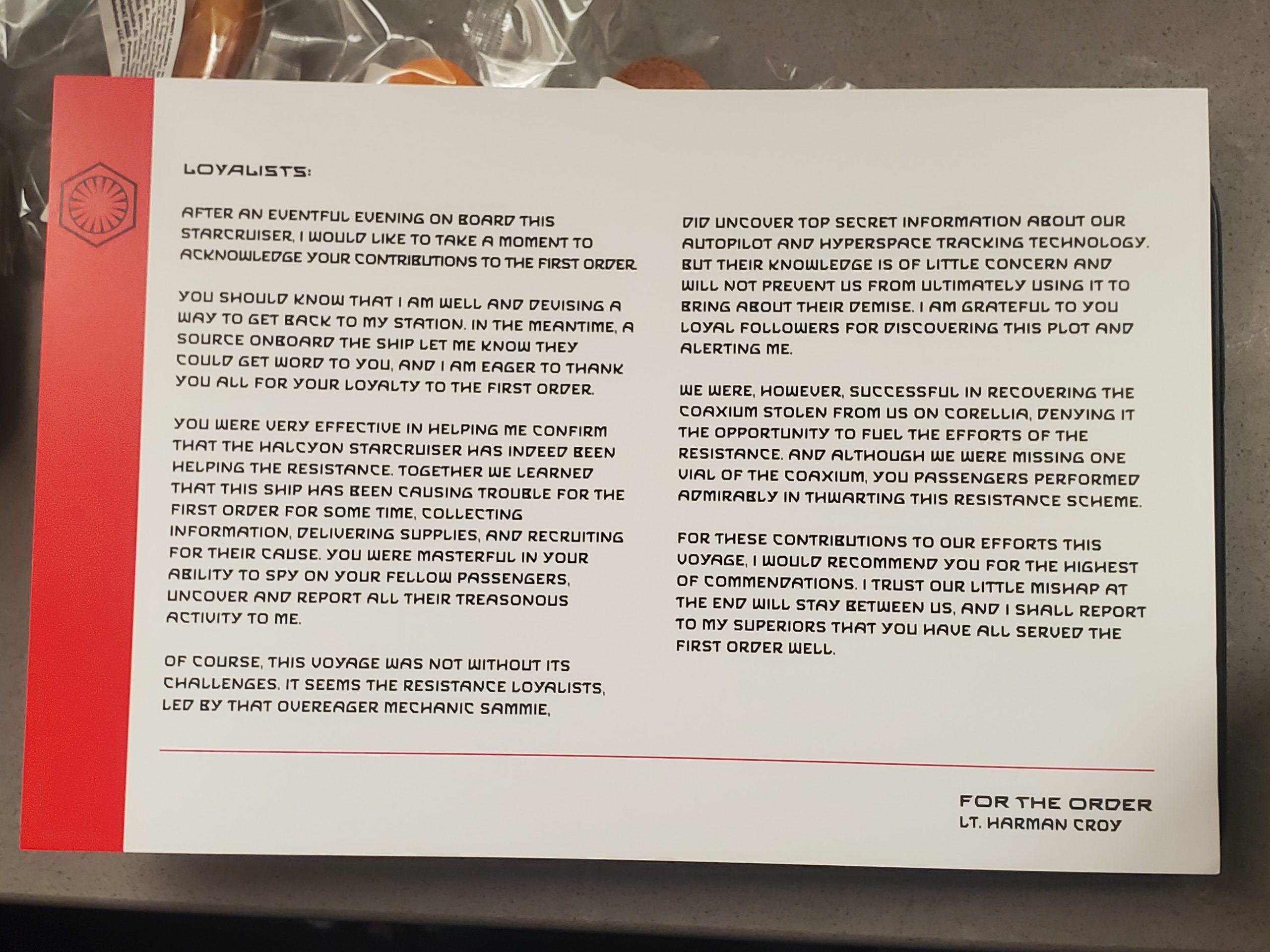
Letter from Lt Croy

Letter from Lt Croy

What else did you notice that I missed?  I’m sure there is plenty more. Let me know in the comments below!

Adding ed25519 SSH Host Keys via cloud-init

SSH Host Keys are they Public / Private keys that identify a server when connecting to it via SSH.
Most people don’t understand very well how these work, and just quickly click, or type ‘yes’ to approve the Key Fingerprint
when you connect via SSH to a server.

The first time you connect to a server, you will see something like this:

The authenticity of host '[myremoteserver.com]:22 ([12.34.56.78]:22)' can't be established.
ED25519 key fingerprint is SHA256:Vqfv339yJU/zRADJ4SlgF8DcZ0d7Cy1zWX69C33d3e4.
This key is not known by any other names.
Are you sure you want to continue connecting (yes/no/[fingerprint])?

This means that it is the first time your computer has connected to the remote SSH. It is asking if the Key Fingerprint is what you expected. Since we don’t tend to communicate key fingerprints in advance, we usually trust that this is correct and just type ‘yes’.

But this is an important part of the Authentication process. There are a number of possible ways that the remote server may NOT be the server you intend. You could have simply typed the hostname wrong. More nefarious examples might include DNS hijacking or rerouting of your traffic.

When you answer ‘yes’ to that question, the host key fingerprint is saved to a file on your machine in ~/.ssh/known_hosts. If you connect to the same host again, it won’t ask that question again, since you’ve already approved it.

Note that SSH Host Keys (sometimes called SSH Instance Keys) are in the same format, but have a different purpose than SSH User Keys with which most people are familiar. The Host Keys are intended to identify the MACHINE, while your user key is meant to identify YOU.

The SSH Host Key is usually created when an instance is turned on for the first time. When the SSH Server Starts, if it doesn’t find existing host keys, it creates them using a pseudo-random number generator. It kindof just magically happens without anyone having to think about it.

I happen to connect to a lot of servers that are turned on by AWS Auto Scaling Groups. Whenever a new server is launched, that instance creates new SSH Host Keys. If a server has been recreated since I last connected to it, I get this nasty error message:

user@my-machine ~ % ssh ubuntu@myremotemachine
@@@@@@@@@@@@@@@@@@@@@@@@@@@@@@@@@@@@@@@@@@@@@@@@@@@@@@@@@@@
@    WARNING: REMOTE HOST IDENTIFICATION HAS CHANGED!     @
@@@@@@@@@@@@@@@@@@@@@@@@@@@@@@@@@@@@@@@@@@@@@@@@@@@@@@@@@@@
IT IS POSSIBLE THAT SOMEONE IS DOING SOMETHING NASTY!
Someone could be eavesdropping on you right now (man-in-the-middle attack)!
It is also possible that a host key has just been changed.
The fingerprint for the ED25519 key sent by the remote host is
SHA256:Vqfv339yJU/zRADJ4SlgF8DcZ0d7Cy1zWX69C33d3e4.
Please contact your system administrator.
Add correct host key in /Users/myusername/.ssh/known_hosts to get rid of this message.
Offending ED25519 key in /Users/myusername/.ssh/known_hosts:16
Host key for [myremotemachine]:22 has changed and you have requested strict checking.
Host key verification failed.

This error message explains that the SSH Host Key of the machine to which I’ve attempted to connect doesn’t match what it used to be. This could be due to a man-in-the-middle attack, or it could be that the host key legitimately changed, as is what happens when my Auto-Scaling group creates a new instance.

You can “fix” this error by editing your ~/.ssh/known_hosts file and removing the offending line that is mentioned. In this example, it is line 16.

I’ve recently gotten tired of fixing my known_hosts file and have started changing my Auto-Scaling groups so that they use the same Host Key each time that the instance starts. That means I don’t get the error message, and it saves me ~10 seconds (and doesn’t break my train-of-thought) when connecting to an instance that has been replaced.

This is an example of what I enter into the UserData section of my CloudFormation template inside the LaunchTemplate section. It specifies two pre-generated SSH Keys so that each time the instances launches, it will have the same host key.

In order to generate these, I usually just launch an instance the first time without it, then grab the four files mentioned. The files are contained in:

  • /etc/ssh/ssh_host_ecdsa_key
  • /etc/ssh/ssh_host_ecdsa_key.pub
  • /etc/ssh/ssh_host_ed25519_key
  • /etc/ssh/ssh_host_ed25519_key.pub

You could also create these files in advance using ssh-keygen.
My example below uses the newer ecdsa and ed25519 keys, and avoids using the older rsa and dsa keys. This should work fine for most modern distributions and SSH Clients.

UserData: !Base64 |
  #cloud-config
  write_files:
    - path: /etc/motd
      owner: root:root
      permissions: '0644'
      content: |
        You are connected to my-hostname

  ssh_keys:
    ecdsa_private:
      -----BEGIN OPENSSH PRIVATE KEY-----
      put-your-private
      key-contents
      here
      -----END OPENSSH PRIVATE KEY-----
   ecdsa_public:
      ssh-ed25519 AAAAyour-public-key-contents-here ecdsa-my-hostname

    ed25519_private:
      -----BEGIN OPENSSH PRIVATE KEY-----
      put-your-private
      key-contents
      here
      -----END OPENSSH PRIVATE KEY-----
   ed25519_public:
      ssh-ed25519 AAAAyour-public-key-contents-here ed25519-my-hostname

There is one downside, that the host keys are now stored in my CloudFormation template, so I need to make sure and keep that secure. Anybody that has access to these keys could impersonate the server on which it is used.

Query to view the InnoDB History List Length

The InnoDB History List Length is an important metric the I continuously need to check and monitor. Especially on database servers with a write-heavy workload. I’ve been bitten several times when the MySQL server seems to be operating fine, but it gets a huge backlog of writes.

You can issue the show engine innodb status; command to see the whole InnoDB status, which includes the History List Length, like this:

------------
TRANSACTIONS
------------
Trx id counter 725255284309
Purge done for trx's n:o < 725255284309 undo n:o < 0 state: running but idle
History list length 12

But that can be easily lost in the huge wall of text.

Somewhere around the release of MySQL 8, you can obtain this important metric from a straightforward query

select count from information_schema.innodb_metrics where name = 'trx_rseg_history_len';

mysql> select count from information_schema.innodb_metrics where name = 'trx_rseg_history_len';
+-------+
| count |
+-------+
|    16 |
+-------+
1 row in set (0.01 sec)

I've you're an AWS / RDS customer, I'd love to have the History List Length to be a native graph available with all MySQL instances. I wrote a request for this on AWS re:Post if you feel like voting it up.

« Older posts Newer posts »

© 2026 Brandon Checketts

Theme by Anders NorenUp ↑